Work with Shubham
Your next big thing starts here.
Whether you're launching from zero or leveling up an existing platform, I'll help you build something that performs, scales, and lasts.
Start a projector stay in the loop
Work with Shubham
Whether you're launching from zero or leveling up an existing platform, I'll help you build something that performs, scales, and lasts.
Start a project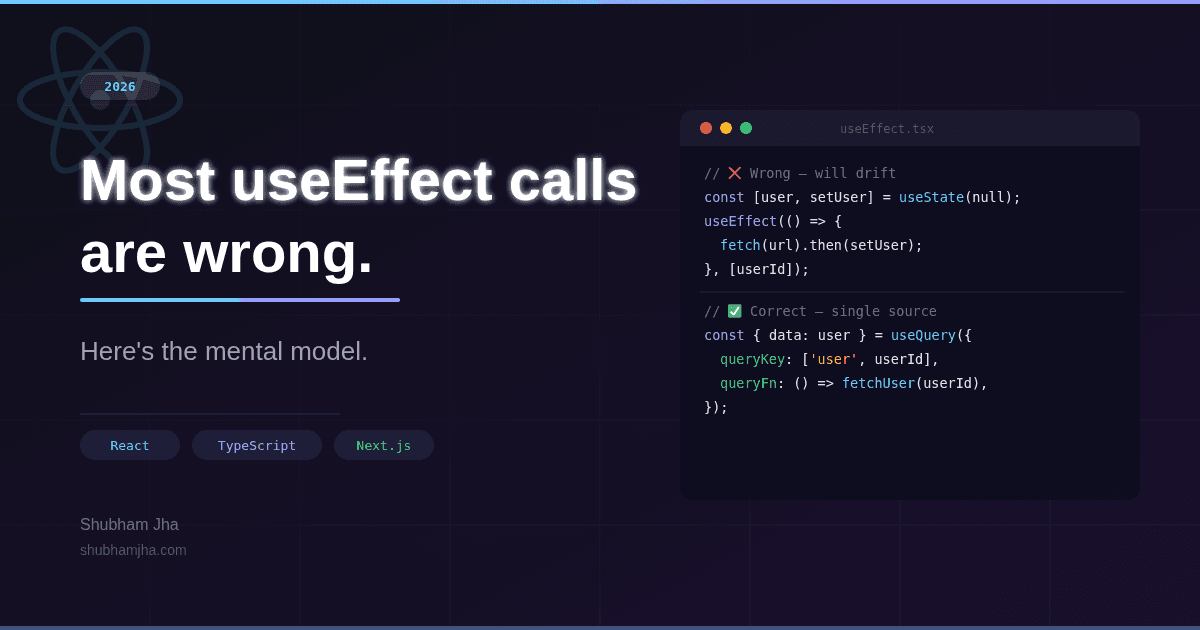
The bug had been in production for three weeks before anyone noticed. A user's dashboard was showing stale data — not always, not on refresh, just sometimes, after a specific sequence of navigation. Three of us spent a Friday afternoon tracing it. The root cause was four lines: server state duplicated into local state, a React hook that was supposed to keep them in sync, and a dependency array missing one key value.
The fix was deleting code. Thirty-two lines became four. The stale state problem went away because there was no longer a second copy of the data to go stale.
That incident reshaped how I think about React. Hooks especially — flexible enough to solve almost any problem, and flexible enough to create subtle, expensive bugs when you reach for them without knowing what they're actually for. This post is that mental model — what React hooks are actually for, and where almost every bug that involves them originates. Good React, I've come to think, is almost always subtractive.
The best React I've written has always been the code I deleted.
The patterns below are what that looks like in practice.
TL;DR — State should be categorized before a hook is written.
useEffectis an escape hatch, not a default tool. TypeScript's value is making impossible states unrepresentable. Custom hooks are APIs, not just shared logic. The React Compiler handles most memoization now. Server Components have shrunk the legitimate use cases for client-side hooks.
React has moved a long way from "UI library you drop into a page." It now ships with a server layer, a client layer, and a compiler that sits between your code and the DOM. That changes what hooks are actually for.
The question you ask before writing any component used to be "how do I manage this state?" Now it's: does this need to run on the client at all?
In the Next.js App Router world, components are Server Components by default. They can fetch data directly, access databases, and render HTML with zero client JavaScript. You opt into client behaviour with 'use client'. Every time you do, you're making a deliberate choice to ship JavaScript to the browser and accept the complexity that comes with it.
Hooks only exist in Client Components — a design constraint, not a limitation. They're for client-side behaviour: user interactions, browser APIs, local UI state, effects that genuinely need the browser. Not for data the server could fetch. Not for transformations that can happen at render time. If you're reaching for a hook, it should be because nothing else will do.
In practice, the stack looks like this:
Every pattern in this post fits into one of these layers. If you want a broader view of how they fit into a production architecture, this production React architecture guide goes deeper.
Most hook-related bugs aren't hook bugs. They're state modelling bugs. The hook is just where they surface.
Before you write anything, categorize the state you need:
UI state is local to a component or a small subtree: modal open/closed, tab selection, form input values, hover state. This lives in useState or useReducer. It doesn't need to be global, and it doesn't need to be persisted.
Server state is data that lives on a server and is temporarily cached on the client: user profiles, product lists, feed items. It has its own lifecycle — loading, stale, revalidating — that's fundamentally different from local state. This belongs in TanStack Query, not useState. Every time you copy server state into local state, you're creating a second source of truth that will eventually drift.
Shared app state is client-side state that needs to cross component boundaries: the current user session, the active theme, a cart. This lives in Zustand or Context. Keep it lean — global state is the hardest kind to trace.
The categorization matters because it defines your rendering model. Mixing them is where most React bugs come from: components showing inconsistent data, forms that reset unexpectedly, dashboards stuck on yesterday's totals.
// Wrong: server state duplicated into local state — will drift
const [user, setUser] = useState<User | null>(null);

useEffect(() => {
  fetchUser(userId).then(setUser);
}, [userId]);

// Correct: let TanStack Query own the lifecycle
const { data: user, isLoading } = useQuery({
  queryKey: ['user', userId],
  queryFn: () => fetchUser(userId),
});
The useState version has none of that — no caching, no deduplication, no background refresh, no cancellation on unmount. The useQuery version has all four for free, and it's the single source of truth across every component that queries the same key.
One rule worth keeping close: if data came from a network request, it's server state. Don't put it in useState.
Once your state is categorized correctly, the next question is effects. This is where most codebases quietly accumulate debt.
Here's an uncomfortable thing to say about a hook you use every day:
Most useEffect calls in production codebases are wrong — not buggy on the surface, but wrong in category.
They're solving problems React already solves elsewhere, using an API designed for something else entirely. The hook's flexibility is the problem. It makes every nail look like an effect.
Here's a pattern you've almost certainly shipped:
const [userId, setUserId] = useState<string | null>(null);
const [userName, setUserName] = useState('');

useEffect(() => {
  if (userId) {
    setUserName(users[userId].name);
  }
}, [userId]);
It works. It probably passes code review. It's also wrong, and it'll cause you a bug.
The problem isn't the hook. It's using it to set state that could be derived directly during render. Every time userId changes, React has to: render, run the effect, set new state, and render again. Two renders, one stale intermediate state, and a footgun left for whoever touches this next. The fix is one line:
const userName = userId ? users[userId].name : '';
No effect. No second render.
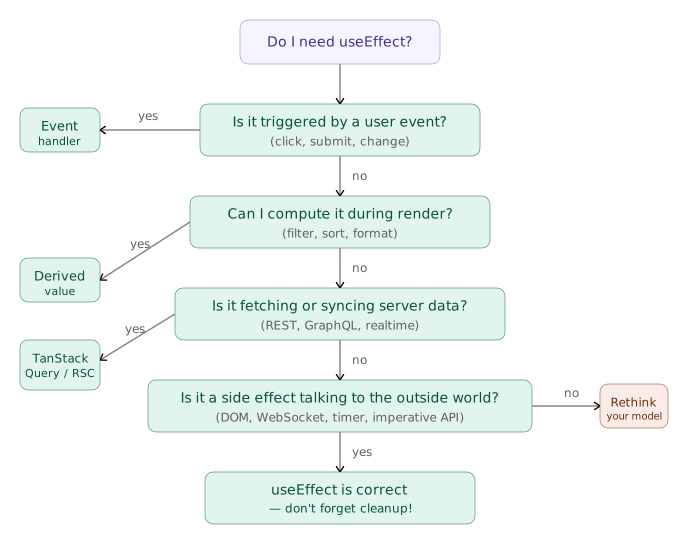
useEffect is for talking to the outside world. If what you're writing into one doesn't involve a subscription, a DOM mutation, a timer, a WebSocket, or an imperative third-party library, it probably doesn't belong there. React's own docs describe useEffect as an "escape hatch". That word choice isn't accidental. The legitimate use cases have genuinely shrunk.
Three antipatterns worth naming
Fetching data in an effect. The classic pattern — useEffect(() => { fetch(...).then(setData) }, []) — has five problems baked in: no loading state, no error handling, no cancellation on unmount, no deduplication on re-mount, and no caching. You'll eventually add all five, and what you've built, badly, is TanStack Query. Use the real thing instead.
Deriving state inside an effect. If you find yourself writing useEffect(() => { setSomething(deriveFrom(other)) }, [other]), you've modelled state incorrectly. Compute the derived value during render. If the computation is expensive, reach for useMemo — but measure first, because the React Compiler handles most of this automatically in React 19.
Putting event-response logic in an effect.
// Wrong — asynchronous, hard to trace, depends on state sync
useEffect(() => {
  if (submitted) {
    trackAnalytics('form_submit');
    resetForm();
  }
}, [submitted]);

// Correct — synchronous, explicit, readable
function handleSubmit() {
  trackAnalytics('form_submit');
  resetForm();
  setSubmitted(true);
}
Some cases where useEffect genuinely belongs: addEventListener / removeEventListener, ResizeObserver, IntersectionObserver, WebSocket connections, imperative third-party libraries (charts, maps, rich text editors), setInterval with paired cleanup, matchMedia, geolocation watch. What they all have in common is a setup step and a teardown step.
Cleanup isn't optional. If your effect registers anything, it has to deregister it.
useEffect(() => {
  const ws = new WebSocket('wss://api.example.com/feed');
  ws.onmessage = (e) => setFeed(JSON.parse(e.data));

  return () => ws.close(); // always
}, []);
An effect without cleanup is a memory leak in development (StrictMode surfaces it immediately by double-invoking effects) and a silent bug in production.
Before writing any effect, ask: does it need cleanup? Can it run twice without harm? Are all dependencies listed? If you're omitting a dependency because "it won't change," that belief belongs in a useRef — not silently missing from the array. Enable exhaustive-deps in ESLint and treat its warnings as errors.
Getting effects right closes one hole. Impossible states that TypeScript lets you write by default need a different fix.
Most production React codebases have TypeScript configured. What's surprising is how few use it beyond the surface — interfaces on props, a typed useState, and then any everywhere things get hard. That's not type safety. It's a typed façade over untyped logic.
The patterns below catch real bugs before production and make your hooks readable six months later — including to you.
Drop React.FC and the old import
Since React 17, import React from 'react' is no longer needed. More importantly, React.FC is an antipattern — it implicitly adds children to every component, hides your return type, and makes generic components awkward. Use explicit function signatures:
// Old — avoid
const Button: React.FC<ButtonProps> = ({ label, onClick }) => { ... };

// Modern — prefer
interface ButtonProps {
  label: string;
  onClick: () => void;
  variant?: 'primary' | 'ghost';
}

function Button({ label, onClick, variant = 'primary' }: ButtonProps) {
  return <button className={variant} onClick={onClick}>{label}</button>;
}
Discriminated unions for async state
In six years of React, this one change has caught more production bugs than anything else on this list. Almost every component has some version of this:
// The problem — three booleans that can contradict each other
const [data, setData] = useState<User | null>(null);
const [isLoading, setIsLoading] = useState(false);
const [error, setError] = useState<string | null>(null);
Three booleans give you eight states. Only three are valid. You're shipping the other five as bugs.
Instead, model the states as what they actually are:
type AsyncState<T> =
  | { status: 'idle' }
  | { status: 'loading' }
  | { status: 'success'; data: T }
  | { status: 'error'; error: string };

function UserProfile() {
  const [state, setState] = useState<AsyncState<User>>({ status: 'idle' });

  if (state.status === 'loading') return <Spinner />;
  if (state.status === 'error') return <ErrorMessage message={state.error} />;
  if (state.status === 'success') return <Profile user={state.data} />;
  return null;
}
TypeScript now knows state.data only exists when status === 'success'. Accessing it in the loading branch is a compile error, not a runtime crash. That's what the type system is for.
Type your hooks explicitly — especially tuple returns
TypeScript infers (string | Dispatch<...>)[] from a hook that returns [value, setter] — a union array where both elements appear to have the same type to callers. Fix it with an explicit return type:
// Inferred incorrectly — callers lose type safety on destructuring
function useUsername() {
  const [name, setName] = useState('');
  return [name, setName]; // ❌
}

// Explicit tuple — correct types flow through
function useUsername(): [string, (name: string) => void] {
  const [name, setName] = useState('');
  return [name, setName]; // ✅
}
For hooks that wrap behaviour across any data shape, generics carry the type through:
type FetchState<T> =
  | { status: 'loading' }
  | { status: 'success'; data: T }
  | { status: 'error'; error: string };

// Note: this illustrates typed generics — for production data fetching, use TanStack Query instead
function useFetch<T>(url: string): FetchState<T> {
  const [state, setState] = useState<FetchState<T>>({ status: 'loading' });

  useEffect(() => {
    let cancelled = false;
    fetch(url)
      .then(res => { if (!res.ok) throw new Error(`HTTP ${res.status}`); return res.json() as Promise<T>; })
      .then(data => { if (!cancelled) setState({ status: 'success', data }); })
      .catch(err => { if (!cancelled) setState({ status: 'error', error: err.message }); });
    return () => { cancelled = true; };
  }, [url]);

  return state;
}

// Fully typed at the call site
const state = useFetch<User>('/api/user/42');
if (state.status === 'success') console.log(state.data.name); // ✅
unknown over any in error handling
any turns off the type checker. unknown keeps it on and forces you to validate before use — which is what you actually want when catching errors:
// any — runtime crash if err is a string, not an Error object
catch (err: any) { setError(err.message); }

// unknown — TypeScript forces the guard
catch (err: unknown) {
  if (err instanceof Error) setError(err.message);
  else setError('An unexpected error occurred');
}
Two extra lines that prevent real bugs — the kind that only show up in edge cases and produce error screens you can't reproduce locally.
useReducer with discriminated actions for complex state machines
Once a component has more than three related state values and more than two update paths, useState starts fighting you. useReducer with typed actions makes every valid transition explicit:
type FormAction =
  | { type: 'FIELD_CHANGE'; field: 'email' | 'password'; value: string }
  | { type: 'SUBMIT' }
  | { type: 'SUBMIT_SUCCESS' }
  | { type: 'SUBMIT_ERROR'; message: string }
  | { type: 'RESET' };

function formReducer(state: FormState, action: FormAction): FormState {
  switch (action.type) {
    case 'FIELD_CHANGE': return { ...state, values: { ...state.values, [action.field]: action.value } };
    case 'SUBMIT':       return { ...state, status: 'submitting', errorMessage: null };
    case 'SUBMIT_SUCCESS': return { ...state, status: 'success' };
    case 'SUBMIT_ERROR': return { ...state, status: 'error', errorMessage: action.message };
    case 'RESET':        return initialState;
  }
}
Every possible transition is in one place. Testing the reducer is pure function testing — no component mounting required. TypeScript checks every branch of the switch, so if you add a new action type and forget the case, the compiler tells you before the user does.
All of these patterns share a goal: use the type system to make impossible states unrepresentable — not documenting what can go wrong, but making wrong combinations inexpressible before they get written.
Every good React codebase I've worked in has had the same folder — small, typed custom hooks that nobody had to think about. You just reach for them. They're boring on purpose. Predictable signatures, no hidden behaviour, sensible defaults.
Think of custom hooks as internal APIs — they have a contract. Same inputs, same outputs, every time. If a hook behaves differently depending on where it's called or when its arguments change, it's not an API — it's a trap.
Four hooks every production codebase needs
useDebouncedValue prevents search inputs and filter controls from hammering the server on every keystroke:
function useDebouncedValue<T>(value: T, delay: number): T {
  const [debounced, setDebounced] = useState<T>(value);

  useEffect(() => {
    const timer = setTimeout(() => setDebounced(value), delay);
    return () => clearTimeout(timer);
  }, [value, delay]);

  return debounced;
}

// Usage
const debouncedQuery = useDebouncedValue(searchQuery, 300);
// Pass debouncedQuery to your API call, not searchQuery
useDisclosure manages the open/closed state of modals, drawers, and popovers without repeating the same useState(false) pattern across dozens of components:
interface UseDisclosureReturn {
  isOpen: boolean;
  open: () => void;
  close: () => void;
  toggle: () => void;
}

function useDisclosure(initial = false): UseDisclosureReturn {
  const [isOpen, setIsOpen] = useState(initial);
  return {
    isOpen,
    open: useCallback(() => setIsOpen(true), []),
    close: useCallback(() => setIsOpen(false), []),
    toggle: useCallback(() => setIsOpen(prev => !prev), []),
  };
}
useLocalStorage syncs React state with localStorage, with SSR safety built in. The naive implementation crashes on the server because localStorage doesn't exist there:
function useLocalStorage<T>(key: string, initialValue: T): [T, (value: T) => void] {
  const [stored, setStored] = useState<T>(() => {
    if (typeof window === 'undefined') return initialValue; // SSR guard
    try {
      const item = window.localStorage.getItem(key);
      return item ? (JSON.parse(item) as T) : initialValue;
    } catch {
      return initialValue;
    }
  });

  const setValue = useCallback((value: T) => {
    try {
      setStored(value);
      if (typeof window !== 'undefined') {
        window.localStorage.setItem(key, JSON.stringify(value));
      }
    } catch (err) {
      console.warn(`useLocalStorage: failed to write key "${key}"`, err);
    }
  }, [key]);

  return [stored, setValue];
}
usePrevious gives you the last render's value — useful for animations, comparison logic, and knowing whether a value went up or down:
function usePrevious<T>(value: T): T | undefined {
  const ref = useRef<T>();
  useEffect(() => { ref.current = value; });
  return ref.current;
}
These four cover the majority of cases. Knowing when not to reach for a custom hook matters just as much.
When not to extract a hook
Extraction adds indirection. A reader now has to jump to another file to understand what a component does. That trade-off is worth it when the logic is genuinely reused in three or more places, or when isolating it makes testing meaningfully easier.
If logic only lives in one component and is easy to follow inline, leave it inline. Custom hooks aren't a tidying mechanism — they're an API boundary. Treat them like one.
When to reach for a library instead
usehooks-ts and ReactUse cover most common primitives with strong TypeScript support, SSR safety, and active maintenance. Before writing useMediaQuery, useEventListener, useOnClickOutside, or useIntersectionObserver from scratch, check if the library already has a well-tested version. Rolling your own is only worth it when you need behaviour the library doesn't support, or when its API doesn't match your team's conventions.
A good hook library means one less thing to write. That's worth something before you even get to profiling.
The most impactful performance change in React 19 is the React Compiler — and you don't have to write it. It automatically memoizes components, computed values, and callbacks — work you used to do by hand with useMemo, useCallback, and React.memo.
The APIs aren't dead. The bar for reaching for them manually is just a lot higher now.
When useMemo and useCallback still matter
The React Compiler handles most cases. The ones it doesn't handle cleanly are:
react-window, react-virtual) where reference stability directly controls whether rows re-renderOutside those cases, reach for profiling data before reaching for useMemo.
Component splitting: the optimization nobody reaches for first
Before touching any memoization API, look at your component tree. A large component that renders an expensive subtree will re-render the entire subtree whenever any piece of its state changes — even if that state has nothing to do with the expensive part.
The fix is splitting:
// Before: SearchBar state change re-renders the entire page including ExpensiveList
function SearchPage() {
  const [query, setQuery] = useState('');
  return (
    <div>
      <SearchBar query={query} onChange={setQuery} />
      <ExpensiveList /> {/* Re-renders on every keystroke */}
    </div>
  );
}

// After: SearchBar manages its own state, ExpensiveList is isolated
function SearchPage() {
  return (
    <div>
      <SearchBar />   {/* State lives here */}
      <ExpensiveList /> {/* Never re-renders due to search */}
    </div>
  );
}
No memoization APIs at all. Just a smaller state scope.
It delivers the biggest wins in real codebases, and it's the last thing engineers try.
Diagnosing before optimizing
Open React DevTools Profiler, record a slow interaction, and look at which components are highlighted. The components that re-render most often and take the most time are your actual bottleneck — not the ones you assume are slow.
The user-facing metric that matters most in 2026 is INP (Interaction to Next Paint), which replaced FID in Core Web Vitals in March 2024. Google's Web Vitals specification classifies INP below 200ms as good, 200–500ms as needing improvement, and above 500ms as poor. Most React SPAs with unoptimized re-renders sit in the middle band — technically functional, but sluggish on mid-range hardware. The usual culprits are slow onClick handlers, expensive renders triggered by user input, and long tasks blocking the main thread. For a deeper breakdown of INP and how Next.js affects your scores, this INP optimization guide for Next.js covers it in full.
Lazy loading with Suspense
For components that are large, rarely needed, or only relevant on certain routes, lazy loading keeps your initial bundle small:
import { lazy, Suspense } from 'react';

const HeavyDashboard = lazy(() => import('./HeavyDashboard'));

function App() {
  return (
    <Suspense fallback={<LoadingScreen />}>
      <HeavyDashboard />
    </Suspense>
  );
}
Lazy loading is worth doing before you have profiling data — bundle size directly affects Time to Interactive on initial load, and the cost of lazy() is near zero.
For computation-heavy logic that genuinely needs to move off the JavaScript thread, this practical Rust and WebAssembly with TypeScript guide covers when and how to reach for WebAssembly as the next tier of performance optimization.
The App Router does one thing to your mental model for hooks: it shrinks it. Most of your application simply doesn't need them. If you're still getting familiar with the App Router itself, this Next.js App Router fundamentals guide is a good foundation before going deeper here.
Server Components are the default. They have direct access to databases, file systems, and APIs, and they ship zero JavaScript by default. Adding 'use client' opts you into a client-side bundle, a hydration cost, and all the state-management complexity that comes with it. The question to ask before adding it isn't "does this component have state?" — it's "does this interaction genuinely need the browser?"
Keep 'use client' boundaries as narrow as possible. A page-level directive forces the entire page — and everything it imports — into the client bundle. A component-level directive on just the interactive part keeps the rest of the page server-rendered.
// app/product/[id]/page.tsx — Server Component, no client JS
export default async function ProductPage({ params }: { params: { id: string } }) {
  const product = await getProduct(params.id); // direct DB call
  return (
    <div>
      <ProductDetails product={product} />  {/* Server Component */}
      <AddToCartButton productId={product.id} />  {/* Client Component — isolated */}
    </div>
  );
}
Navigation hooks
In the App Router, useRouter, usePathname, and useSearchParams from next/navigation replace the old next/router imports. All three require 'use client':
'use client';

import { useRouter, usePathname, useSearchParams } from 'next/navigation';

function FilterControls() {
  const router = useRouter();
  const pathname = usePathname();
  const searchParams = useSearchParams();

  function updateFilter(key: string, value: string) {
    const params = new URLSearchParams(searchParams.toString());
    params.set(key, value);
    router.push(`${pathname}?${params.toString()}`);
  }
}
React 19's use() hook
use() is unlike any previous hook — it can be called conditionally, inside loops, inside if statements. It reads a Promise or Context value and integrates with Suspense for loading states:
'use client';
import { use, Suspense } from 'react';

function UserName({ userPromise }: { userPromise: Promise<User> }) {
  const user = use(userPromise); // suspends until resolved
  return <span>{user.name}</span>;
}

// Wrap in Suspense in the parent
<Suspense fallback={<Skeleton />}>
  <UserName userPromise={fetchUser(id)} />
</Suspense>
use() reads a Promise. It doesn't fetch anything or manage caching — the Promise has to already exist. For client-initiated fetching, you still need TanStack Query or similar.
Form handling with useActionState and useFormStatus
React 19 ships two hooks that cut most of the form boilerplate you're used to writing:
'use client';
import { useActionState, useFormStatus } from 'react-dom';

function SubmitButton() {
  const { pending } = useFormStatus();
  return <button type="submit" disabled={pending}>{pending ? 'Saving...' : 'Save'}</button>;
}

function ProfileForm() {
  const [state, formAction] = useActionState(updateProfileAction, { error: null });

  return (
    <form action={formAction}>
      <input name="name" />
      {state.error && <p>{state.error}</p>}
      <SubmitButton />
    </form>
  );
}
useActionState wraps a Server Action and gives you the pending state and last result. useFormStatus reads the status of the nearest parent <form> — the SubmitButton above doesn't need props passed down to it at all.
The anti-pattern: fetching in a Client Component when a Server Component could do it. If you find yourself writing useEffect(() => { fetch('/api/products').then(...) }, []) in a component that isn't interactive, that component probably shouldn't be a Client Component at all.
Before shipping, run through this list. It encodes every mistake described above.
State design
useStateidle | loading | success | error), not three separate booleansEffects
useEffect used for derived state — computed during render insteaduseEffect used for data fetching — TanStack Query or Server Components used insteaduseEffect used for event-response logic — moved to handlers insteadexhaustive-deps ESLint rule is enabled; all warnings resolvedTypeScript
any in hook signatures or return typesunknown, not anyuseReducer used for components with more than three related state valuesCustom hooks
window or localStorage access without typeof window !== 'undefined' guardPerformance
useMemo or useCallbacklazy() + SuspenseuseMemo/useCallback used intentionally, not defensively (let the Compiler handle the rest)Next.js App Router
'use client' boundary is as narrow as possible — component-level, not page-levelnext/navigation, not next/routerThree weeks after that Friday debugging session, I pulled up the component again. The thirty-two lines were four. The effect was gone. The stale data bug hadn't reappeared once — it disappeared from our error tracking on the next deploy and never came back. The component went from re-rendering on every navigation event to rendering exactly once. The code was obviously correct in a way it hadn't been before — not because it was more complex, but because there was less of it to reason about.
That's the pattern. The improvements are almost always subtractive — less code, fewer places for a value to live, fewer things that can drift. The type system's job isn't to annotate your existing complexity — it's to collapse it by making invalid states unreachable.
If you're building up to these patterns from the foundations, this JavaScript, HTML, CSS and React guide for 2026 covers the groundwork they rest on.
If you're building a React or Next.js product and want to pressure-test your architecture or bring in production-ready patterns, you can reach out here.
Published: Fri Apr 03 2026